
Did you just see a low battery warning on your thermostat? Don’t worry; it’s an easy fix! Many thermostats rely on batteries, while others draw power from your home’s electrical system.
If yours uses batteries, changing them regularly can help keep your heating and cooling system running smoothly. In this guide, we’ll walk you through how to replace your thermostat battery step by step.
Signs Your Thermostat Batteries Need Replacing
Most thermostats will alert you when the battery is running low. You might see a flashing battery icon, a warning message, or even a blinking light. These signals usually appear a month or two before the battery completely dies. If you ignore the warning, your thermostat screen may go completely blank, which can disrupt your HVAC system.
What Type of Batteries Do You Need?
Thermostats typically use one of the following types of batteries:
- AA or AAA alkaline batteries
- 3V lithium button batteries
- 9V batteries
Check your thermostat’s manual or open the battery compartment to see which type you need. If your thermostat is hardwired, it may still have a backup battery that needs replacing periodically.
Step-by-Step Guide to Replacing Thermostat Batteries
Before you start, gather a flashlight and a small flat-blade screwdriver (if needed). Follow these simple steps:
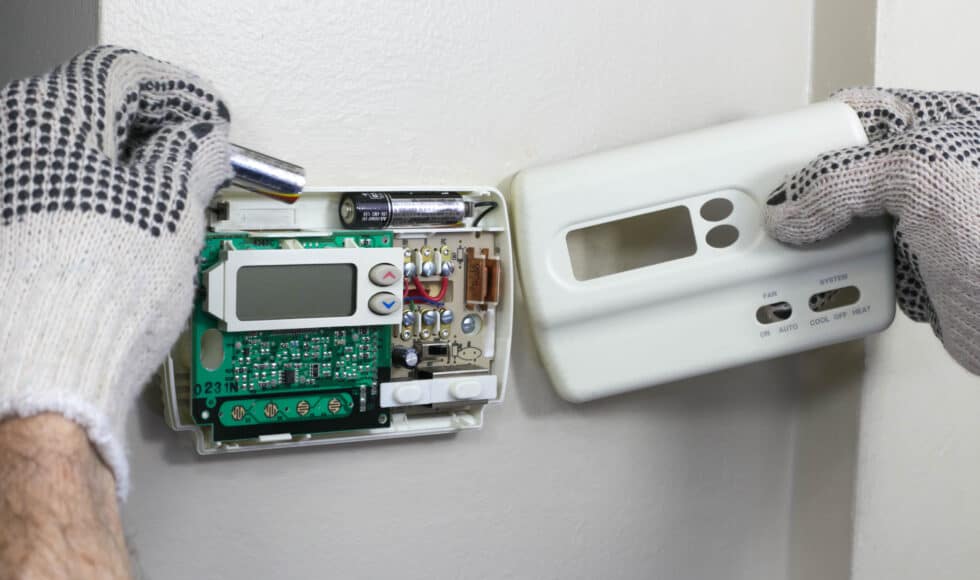
Step 1: Remove the Thermostat Cover
- Most thermostat covers can be gently pulled off.
- If it doesn’t budge, try sliding it upward before pulling.
Step 2: Locate and Remove Old Batteries
- Turn the cover over to find the battery compartment.
- If the batteries are hard to remove, use a flat screwdriver to carefully lift them out.
Step 3: Insert New Batteries
- Match the positive (+) and negative (-) ends of the batteries with the markings inside the compartment.
- Place the new batteries securely in their slots.
Step 4: Reattach the Thermostat Cover
- Line up the cover with the mounting plate.
- Press it into place until you hear a click.
When to Replace Your Thermostat
If you find yourself replacing batteries too often or notice your thermostat isn’t working properly, it may be time for an upgrade. Signs of a failing thermostat include:
- HVAC system not turning on
- Unresponsive temperature settings
- Frequent short cycling
- Loss of programmed settings
Newer models, like smart thermostats, are powered directly through your HVAC system with a backup battery for emergencies. These can save you time and energy in the long run!
Need Help with Your HVAC System?
If your thermostat still isn’t working after a battery change, or you suspect a larger HVAC issue, Bell Brothers is here to help. Contact us today for expert heating and cooling services!